Best Tabliss Alternative in 2026
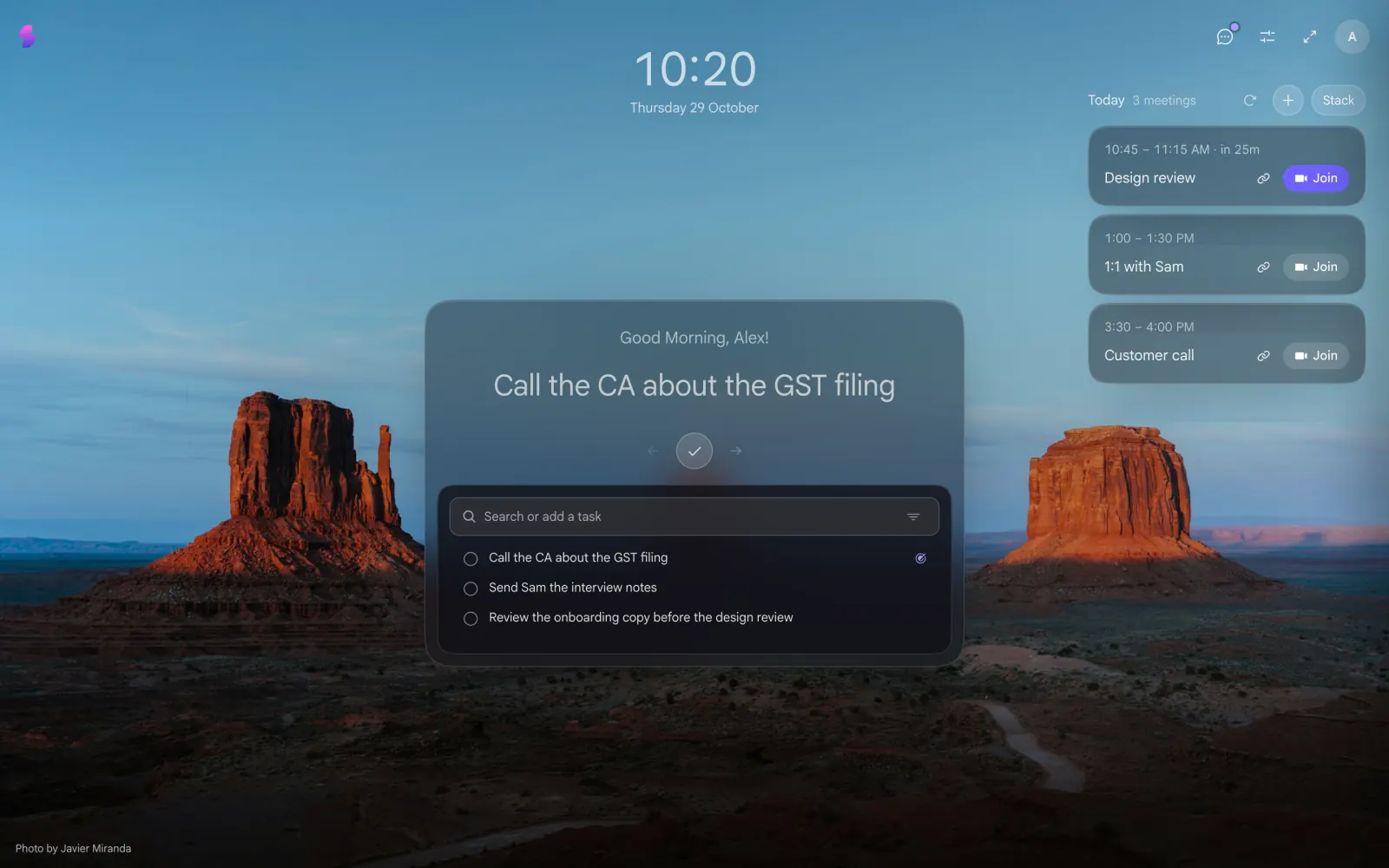
Tabliss is still pretty. It's also asleep.
The last Tabliss update on the Chrome Web Store went out on April 25, 2022. That's version 2.6.0, and nothing since.
It still works for a lot of people. 100,000 of them, actually. But 4.5 years is a long time in browser years. Chrome has changed how extensions work, sites have changed, and the GitHub repo has over 260 open issues waiting for someone.
If you're here, you probably noticed something broke, or you just want a new tab that someone is still looking after. Fair. Let's find you one.
Why people loved Tabliss
Credit where it's due. Tabliss got a lot right:
- Free and open source. No account, no upsell, no “go Pro” popup.
- Gorgeous backgrounds. Unsplash photos, GIFs, gradients, or your own images.
- Lots of widgets. Clock, weather, quotes, quick links, a to-do list, quick notes, even live NBA scores.
- No permissions. It didn't ask to read anything it didn't need.
So whatever you switch to should keep that spirit: free, good-looking, and not nosy.
What's missing now
Nobody's home. No updates since 2022 means no fixes. If a widget breaks tomorrow, it stays broken.
Notes and to-dos that just sit there. Tabliss gives you a box to type in. That's it. You write “call the CA” on Monday, and by Thursday it's buried under 6 other things you also typed into the box.
No idea what your day looks like. There's no calendar. You open a new tab 40 times a day and it can't tell you that your 3pm is in 10 minutes.
None of this is a crime. Tabliss was built as a pretty new tab, and it's still a pretty new tab. It just stopped growing.
Tabliss alternatives, side by side
| Price | Last updated | Tasks and notes | Today's meetings | Best for | |
|---|---|---|---|---|---|
| Slaet | Free to start, optional Pro coming | Oct 2026 | Tasks, notes, lists, plus one task in focus | Yes, with a Join button | People who want their new tab to help with the day |
| Bonjourr | Free | Jul 2026 | Markdown notes | No | People who want a beautiful, minimal tab and nothing else |
| Momentum | Free, Plus is $39.95/year | Actively maintained | To-do list free, more in Plus | Plus only | People happy to pay for focus tools |
| Tabliss | Free | Apr 2022 | Basic to-do and quick notes | No | People who don't mind a frozen app |
Honest take: if all you want is a gorgeous, quiet tab, Bonjourr is great and actively maintained. If you want your tab to actually do something with your day, keep reading. (Want it feature by feature? Here's the full Slaet vs Tabliss comparison.)
Sources: Tabliss, Bonjourr and Momentum Plus, checked October 2026.
Why I built Slaet
I'm Abhishek. I run a design team by day, and I kept losing things in my own head. Not because I didn't write them down. I wrote everything down. I just never saw it again.
So I built a new tab around one idea: your notes and tasks should find you, not the other way round.
Here's what that looks like:
- One task in the middle. Not a wall of 30 to-dos. The one you should probably do now. Done? Tick it, the next one shows up.
- Type anything, sort it later. Tasks, notes, lists. Our motto is “write first. think later.” and we mean it.
- Your meetings, right there. Today's calls show up in the corner with a Join button. No more digging through calendar tabs at 2:59.
- Still pretty. Big photo backgrounds, a clean clock, your shortcuts at the bottom. We didn't forget why you liked Tabliss.
- No guilt. No red overdue counters yelling at you. A new tab should feel like a calm desk, not a report card.
And yes, someone is home. Slaet gets regular updates, and I read every piece of feedback myself.
One more honest thing: Slaet will have an optional paid plan for extra features. That's not a catch. It's the reason Slaet won't end up like Tabliss. Free apps where nobody pays the maker tend to go quiet, and you've just seen how that ends.
How to switch in 2 minutes
- Copy your Tabliss to-dos and notes somewhere safe, like a text file. Takes 30 seconds.
- Install Slaet from the Chrome Web Store.
- Click Keep it when Chrome asks if you meant to change your new tab. You did.
- Remove Tabliss at chrome://extensions. Two new tab extensions fight each other, and nobody wins.
- Add your to-dos in Slaet's task box, one at a time, or paste the whole list into a note. Connect your calendar if you want today's meetings on the tab.
That's it. Open a new tab and say hi.
Add Slaet to Chrome, free to start
One task in focus, your notes, and today's meetings on every new tab.
Try Slaet freeComing from Momentum instead? Read our Momentum alternative guide.