A BlockSite alternative that blocks sites only while you focus
Claims checked November 2026
Slaet is a BlockSite alternative for people who want to block sites while they work on something, not all day. Start a Deep focus session on a task and Slaet blocks the categories and sites you pick, like social media and video, until the timer ends. It runs in the Slaet extension for Chrome, Brave and Edge.
A blocker is a wall. You build it on a good day, and on a bad day you spend ten minutes finding the gap in it.
BlockSite is a very good wall. It blocks by schedule, by keyword and by category, and it can lock itself with a password. Plenty of people need exactly that. But a lot of people searching for an alternative don't want YouTube gone all day. They want it gone for the next 50 minutes, while they write the thing they keep putting off.
That's what Slaet's Deep focus does. You pick a task, start a session, and the sites you chose stay shut until the timer ends.
How it works in Slaet
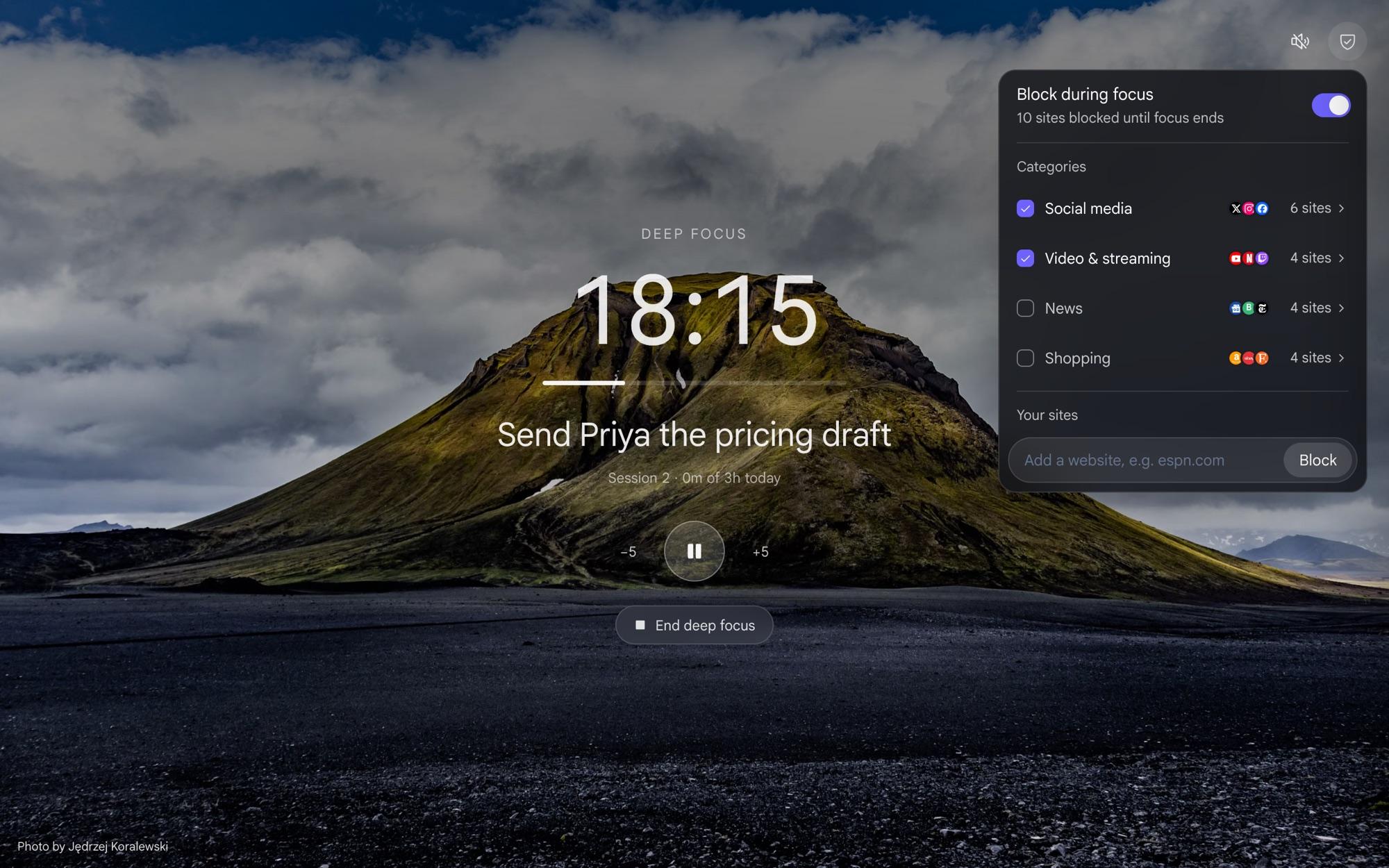
Press Deep focus on your new tab, or the focus button on any task. The screen goes quiet: the task, a timer, and nothing else. Sessions are 25, 50 or 90 minutes, and you can add or take off five minutes as you go.
The blocker sits in the corner. Switch on a category, like social media or video and streaming, or type in your own site. The first time, Chrome asks for permission to block, and Slaet doesn't block anything until you say yes.
When you reach for a blocked site anyway
You will. Muscle memory types the address before you notice. Slaet shows you what you were doing instead of a scolding.
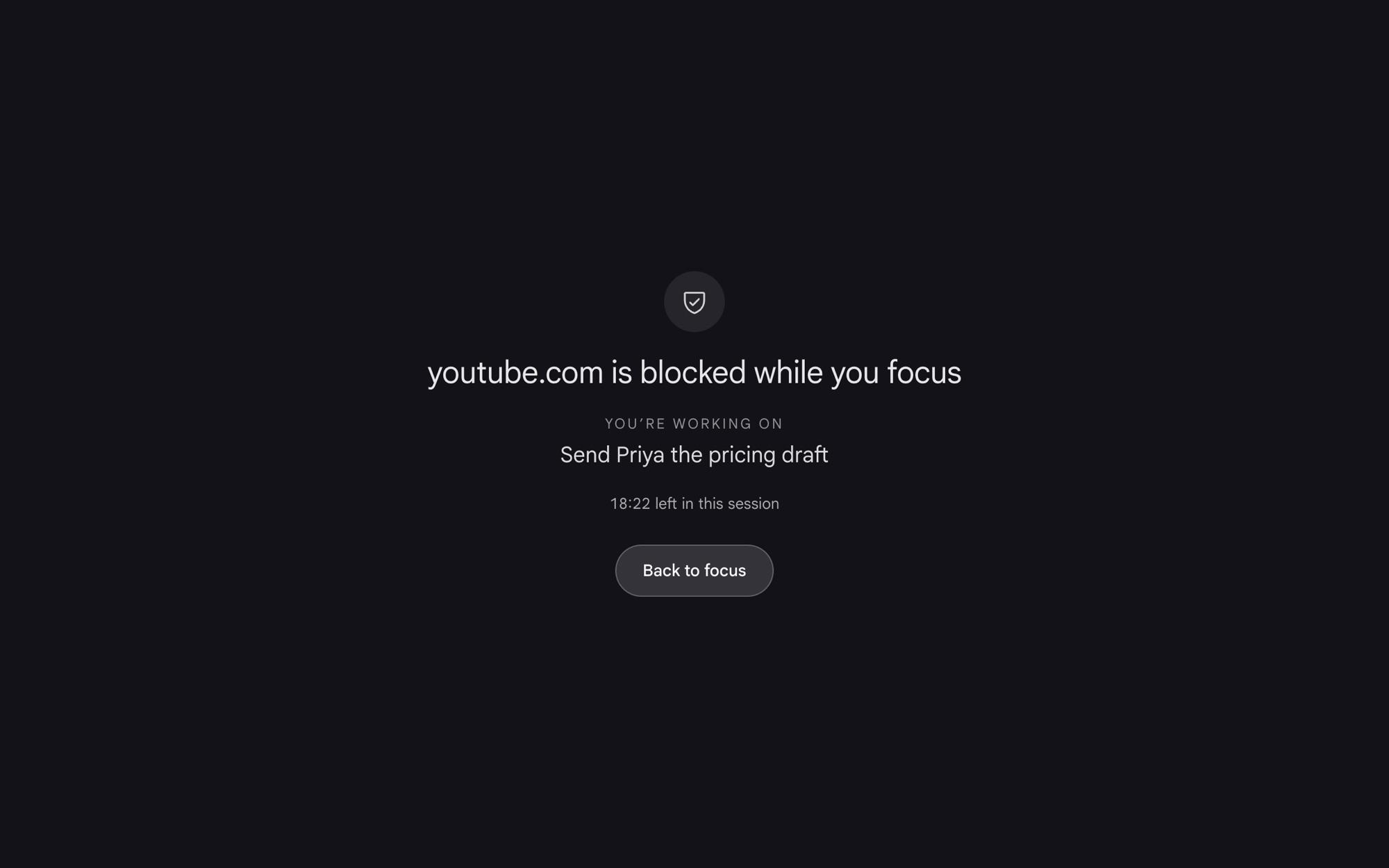
Back to focus takes you back. If you really need the site, say for a tutorial you're following, there's a way through: take a breath, then open it for five minutes. A wall you can't get past tends to get uninstalled. A short pause is usually enough to remember why you closed the door.
Slaet and BlockSite, side by side
The BlockSite column uses its own plan names, from its upgrade page as it read in November 2026.
| Slaet | BlockSite | |
|---|---|---|
| When it blocks | While a Deep focus session runs. You start it, and the sites unblock when it ends. | When you switch it on. The free plan says “Manual usage only” and “No scheduling”; automated focus modes and routines are Premium. |
| What it blocks | Seven categories (social media, video, news, shopping, games, sports, messaging) plus any site you type in. | Sites and apps, by list, category or keyword. The free plan says “Limited blocking (sites + apps)”. |
| What's on your screen | The task you're working on, a 25, 50 or 90 minute timer, and how long you've focused today. | A block page. Its Focus Mode has timers and breaks. |
| Getting through a block | Back to focus, or take a breath and open the site for five minutes. | Password protection and uninstall prevention, to make it harder. |
| Focus sounds | Rain, waves, brown noise or drift, while the timer runs. | Not listed. |
| Your tasks | Built in. A session is for one task, and the task list is on the same new tab. | Not a to-do app. |
| Devices | The extension for Chrome, Brave and Edge. No phone apps. | Chrome, Safari and Edge, plus iOS and Android. The free plan says “1 device only”. |
| Price | Tasks, lists and notes need no subscription. Deep focus runs in the extension. | A free plan, and Premium for a one-time $49.90 on BlockSite's upgrade page. |
The part a blocker can't do
Blocking takes the distraction away. It doesn't tell you what to do with the time. Slaet's session starts from a task, so the thing you're meant to be doing is the biggest thing on the screen.
If you like sound while you work, a session can play rain, waves, brown noise or a soft drift. There's more on that in brown noise and rain for focus. And when the session ends, Slaet counts it toward a daily goal of two, three or four hours, so you can see the day add up.
Choosing the one task is its own skill. That's in one task on the screen, and why caring about something isn't enough to start it is in the intention-action gap.
Who should pick which
Pick Slaet if you want sites blocked while you work on something, with the task and a timer in front of you, and your to-do list on the same new tab.
Stay with BlockSite if you want blocking on a schedule, a password so you can't switch it off, keyword blocking, or the same rules on your phone. Slaet does none of those.
Where BlockSite is the better tool
BlockSite is a full blocker, and a good one. It blocks by keyword as well as category, runs on a schedule without you starting anything, can lock its settings behind a password, and works on your phone too, with apps for iOS and Android alongside extensions for Chrome, Safari and Edge. If you want sites blocked every weekday from 9 to 6 whether you remember or not, BlockSite does that and Slaet doesn't.
And what Slaet gives up
Slaet only blocks during a Deep focus session you start. There are no schedules, no password lock and no keyword blocking, and there's a way through if you really need a blocked site. It has no phone apps, and the blocker lives in the Chrome extension, so it works in Chrome, Brave and Edge but not Safari, Firefox or the Slaet web app.
Questions people ask
Is there a BlockSite alternative for Chrome?
Yes. Slaet blocks sites in Chrome, Brave and Edge during a Deep focus session. You pick categories like social media, video, news or shopping, add any site of your own, and they stay blocked until the session ends.
What does BlockSite's free plan include?
BlockSite's own upgrade page, read in November 2026, lists the free plan as limited blocking of sites and apps, manual use only, one device and no scheduling. Its Premium plan adds unlimited blocking, automated focus modes, sync across devices and routines, for a one-time $49.90 on that page.
Can Slaet block websites on a schedule?
No. Slaet blocks sites only while a Deep focus session runs, and you start each session yourself. If you want blocking that switches on by the clock, BlockSite or a similar blocker is the better fit.
What happens if I open a blocked site in Slaet?
You get a page that says the site is blocked while you focus, with the task you are working on and the time left. Back to focus takes you back. If you really need the site, Slaet asks you to take a breath first and then lets it open for five minutes.
Which sites can Slaet block?
Seven ready-made categories: social media, video and streaming, news, shopping, games, sports and messaging. You can switch each one on or off and add any other site by typing its address, like espn.com.
No account needed · works offline
Today's tasks and meetings on every new tab, with notes one Esc away.
Feature and pricing claims about BlockSite were read from lp3.blocksite.co and last verified in November 2026. BlockSite may have changed since, so check their site for current details. Slaet is not affiliated with BlockSite, and BlockSite is a trademark of its respective owner.