Get Your Most-Visited Sites Back on a Custom Chrome New Tab
Installed a new tab extension and lost Chrome's shortcut tiles? Why they vanish, and how to get your most-visited sites back in one row under today's task.
November 2026 · 3 min read
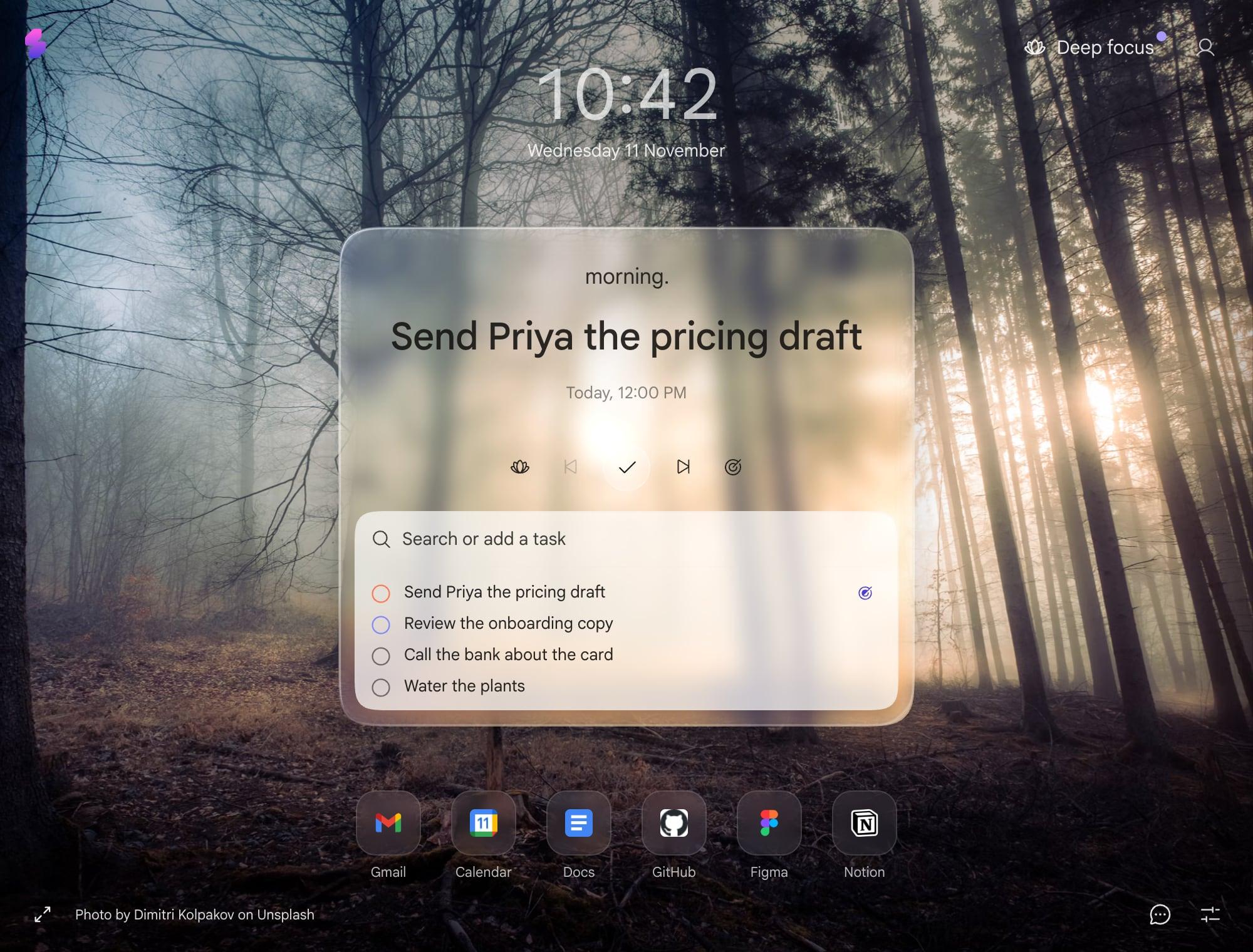
You install a nice new tab extension. It looks great. Then you go to click Gmail and the little tiles are gone. Now you type “mail.google” thirty times a day like it's 2009.
You didn't break anything. Chrome's shortcut tiles are part of Chrome's own new tab page. When an extension replaces that page, it replaces all of it, tiles included. So the extension has to bring them back itself, and most don't.
Your most-visited sites, in one row
Slaet has a Shortcuts row. It shows up to ten of the sites you visit most, in a single line under the card, the way Chrome used to.
It's your real list, from Chrome: if you live in Gmail, Calendar and GitHub, that's what you get. Hover a site to hide it. If you hide one by mistake, Settings shows how many are hidden, and Show all brings them back.
How to turn it on
- Open a new tab and press the sliders icon at the bottom right.
- Under Layout, switch on Shortcuts.
- Chrome asks whether Slaet can read your most-visited sites. Say yes.
It's off until you switch it on, so Slaet never asks for that permission unless you want the row.
What Slaet does with it
Nothing beyond drawing the row. The list comes from Chrome on your device, and the icons come from Chrome's own favicon cache rather than a third-party icon service, so no list of your sites goes anywhere.
What it isn't
It's not a speed dial. You can't add a site by hand, make folders, or arrange a grid. It's the handful of sites you open most, one click away, and that's on purpose: the middle of the page belongs to today's task.
If your new tab is how you get around the web, and you want a big grid you curate, Infinity New Tab does that well. There's an honest comparison in Slaet vs Infinity New Tab. The row is also in the extension only, not the web app, because only an extension can read your most-visited sites.
For everything else you can change on the page, see how to customize your new tab. And if you're choosing between new tab extensions in the first place, this roundup compares the main ones.
Frequently asked questions
Why did my shortcuts disappear from Chrome's new tab?
Because an extension replaced the new tab. Chrome's shortcut tiles belong to Chrome's own new tab page, so when an extension takes over the page, the tiles go with it.
How do I get my most-visited sites back?
Use a new tab extension that shows them. In Slaet, open Settings on the new tab, switch on Shortcuts under Layout, and allow Chrome to share your most-visited sites. Up to ten appear in a row under the card.
Can I add my own shortcut?
Not in Slaet. The row shows the sites Chrome says you visit most, and you can hide any of them. If you want a speed dial you arrange yourself, Infinity New Tab is built for that.
Does Slaet send my browsing history anywhere?
No. The most-visited list comes from Chrome on your device, and the icons come from Chrome's own favicon cache, not a third-party service.
Slaet for Chrome, Brave and Edge
Your most-visited sites, today's task, and nothing you didn't ask for.